Overview#
Since October 2025 I've worked freelance as a full-stack developer on a multi-tenant KPI management SaaS, with a Go API and a Next.js web app. The client is under NDA, so the product isn't named here.
KPI systems are hard to understand, even for the people who use them. Every KPI has a weight, a target format, a way its months add up, and a formula that turns actuals into a score. I built two LLM features that take that complexity off people's hands. The rule behind both is the same: the model classifies and chooses; code does the math and owns the data.
The Features#
KPI Workbook Converter#
Problem: Every new tenant arrives with KPIs in their own spreadsheet, in their own shape, usually in Indonesian. The meaning lives in free text. "Dihitung akumulasi (SUM) 12 bulan" means the months add up. "Formula khusus: Lebih cepat = 120%, Sesuai deadline = 100%" is three custom scoring tiers. The twelve monthly columns hold actuals, not targets. Before this feature, an admin retyped each sheet into the import template by hand, and explaining the template to each client's staff took just as long.
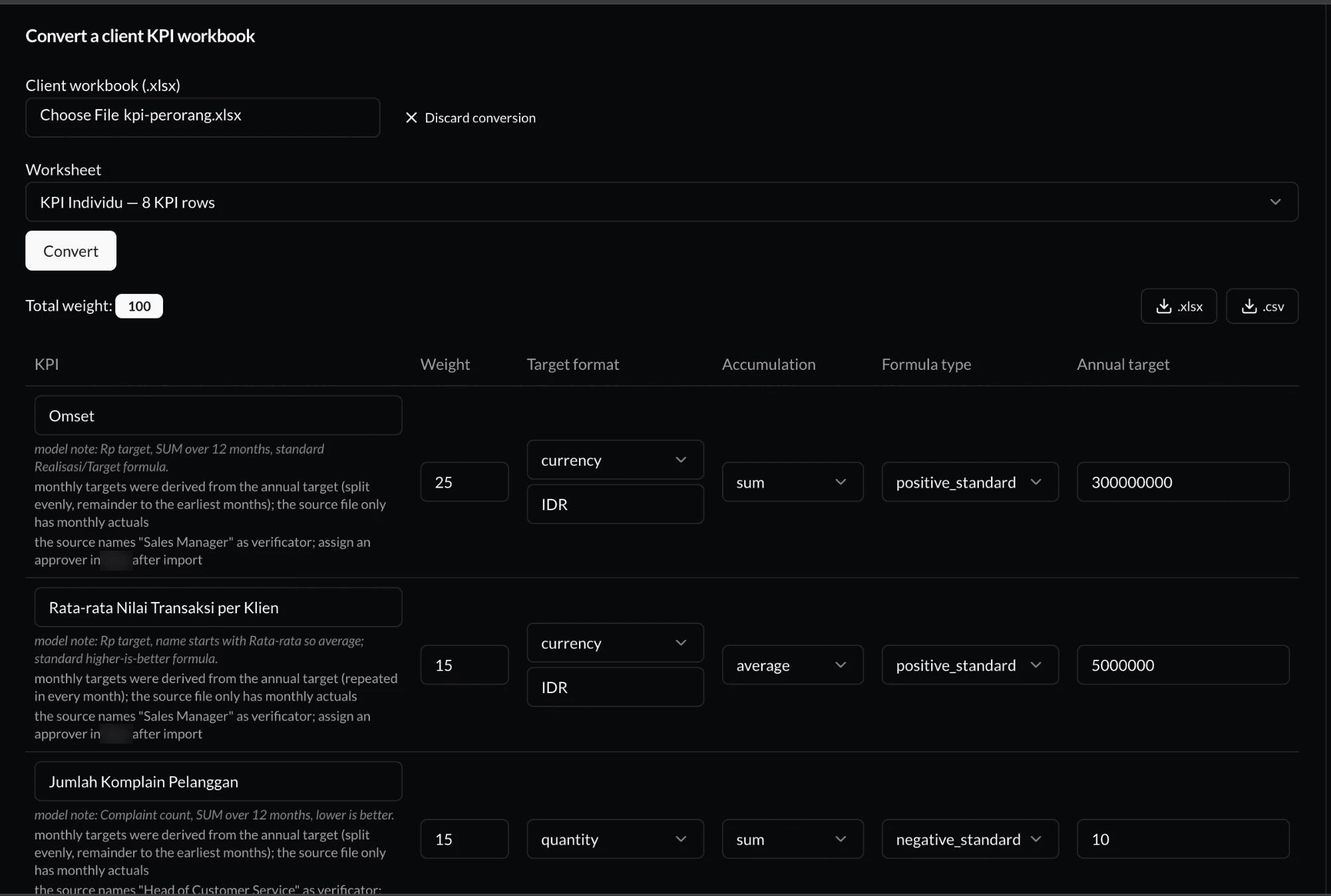
What it does: The admin uploads the client's workbook and picks a sheet. The converter returns a review table with one row per KPI: name, weight, target format, accumulation, formula type and annual target. Each row has a note from the model explaining its choices, plus flags for anything the admin still needs to do, such as assigning an approver after import. The admin corrects what's wrong, then imports the result or downloads it as .xlsx or .csv.
The work is split in two:
- Go does everything numeric. It reads the sheet, parses Rupiah amounts, turns 0.25 into a weight of 25, and splits annual targets into months.
- The LLM only classifies. One forced tool call per sheet returns the target format, accumulation type, formula type and any custom tiers, with a confidence level and a note.
The model never touches a number that becomes a target. A silently wrong annual target is the worst thing this feature could do, and this split makes it impossible.
AI Dashboard Assistant#
Problem: Admins ask different questions about KPI adoption and scores. Building a fixed page for every possible question doesn't scale.
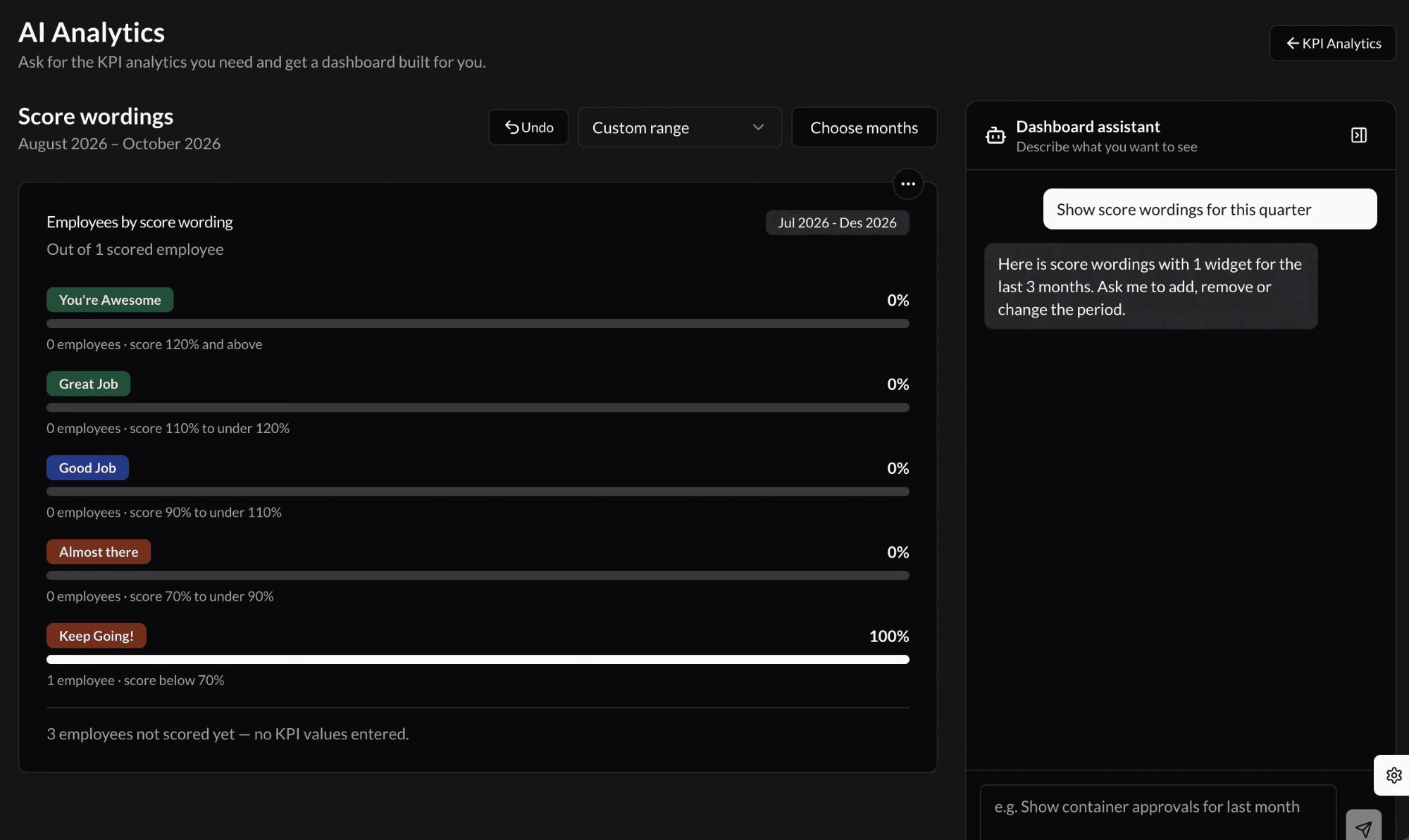
What it does: The admin asks in plain language, for example "show score wordings for this quarter", and gets a dashboard. Follow-up requests add, remove or resize widgets and change the period, and Undo steps back.
- The model only edits a spec. Each turn is one forced
update_dashboardcall that returns the reply and the full next dashboard spec. Widgets can only come from a fixed catalog of sources. - The model never sees tenant data. The browser fetches the numbers through the existing, tenant-scoped analytics endpoints. The assistant needed no new SQL and sends nothing private to the model.
- Bad output fails small. Each widget is validated on its own. Invalid widgets are dropped and reported, so the rest of the dashboard still renders.
- It's measured. An eval harness of 23 cases runs the assistant against realistic requests. Its failures drove fixes such as accepting a spec sent as a string, rejecting stray text after the JSON, and ignoring extra fields the model invents.
Technologies Used#
- Go for the API: workbook parsing, numeric extraction, spec validation and per-user rate limits.
- Next.js and React for the review table, the dashboard canvas and the chat sidebar.
- OpenRouter for model access, with forced tool calls so every answer arrives as structured output.
- PostgreSQL behind the analytics endpoints the dashboard reads from.
Challenges and Learnings#
- Decide what the model is allowed to get wrong. A wrong format guess is cheap because the review table catches it. A wrong number is expensive because nobody looks twice. That's why numbers stay in code.
- Treat model output as untrusted input. Models wrap JSON in strings, add fields, and append text. The validator accepts what's harmless, rejects what isn't, and drops broken widgets one at a time.
- Evals before polish. The eval harness found real failure modes faster than clicking through the UI did.
- Work at the client's pace. The owner sets direction as the product evolves, so I keep each release small and reviewable, and write down the reasoning behind each decision.
Outcome#
The converter turns a client's workbook into a reviewed, importable KPI set in one pass, instead of an admin retyping it field by field. The dashboard assistant's API, validation and eval harness are built, and the web interface is being connected to it. The project is ongoing.